Products
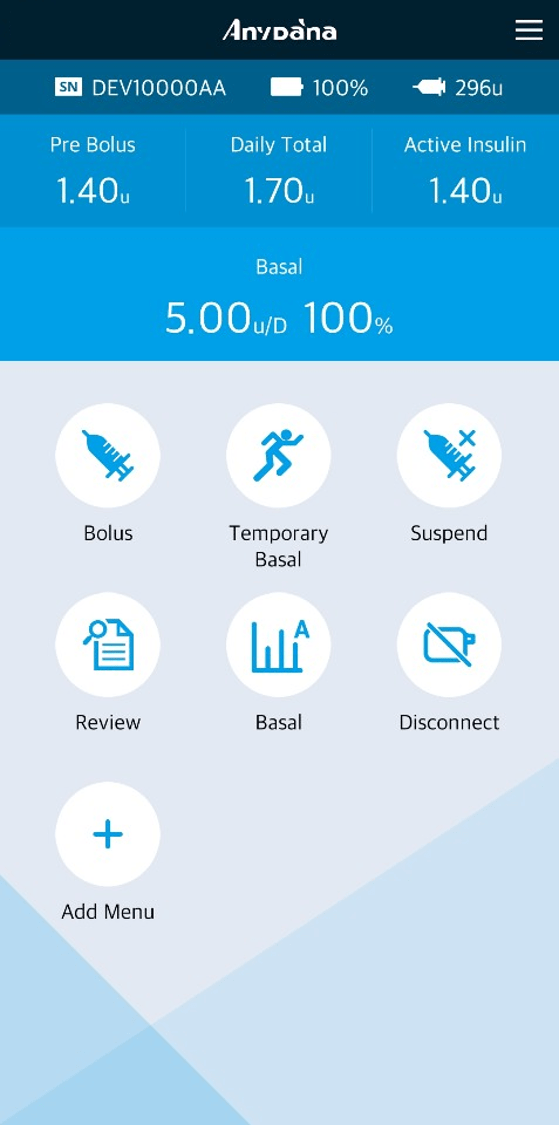
AnyDana


AnyDANA is a Mobile Phone Application paired with the DANA insulin pump.
AnyDANA-A is for Android based device and AnyDANA-i is for iOS based device.
Technical Specifications
AnyDANA is smart phone applications. It connects with DANA Diabecare Insulin pump having Bluetooth technology and operate and control insulin pump. And it provides convenient to users by allowing view the information of the insulin pump with smartphone’s big screen.
AnyDANA has 3 main functions
- • Control and set the DANA Diabecare insulin pumps having Bluetooth telecommunication technology.
- • Review the data and information stored in the insulin pump
- • Receiving the data and information from user’s insulin pump and sending them to specific web server automatically and regularly in wireless internet environment.
Safety Information
Intended use
The DANA Diabecare Insulin Pump and AnyDANA Application are intended for the subcutaneous delivery of insulin for the treatment of diabetes mellitus.
Contraindication
Patients whose vision or hearing is impaired to recognize the signs on the screen of the insulin pump and the mobile phone or the alarms from the insulin pump and the mobile phone. Patients who are not able to operate AnyDANA application, if a helper is not provided.
General Precautions
- 1. AnyDANA can be downloaded from the Google Play Store or App store. Install AnyDANA on a compatible Device. As required or when prompted from the Google Play Store/App Store always update the software.
- 2. Before using this software, the insulin pump must be paired with the compatible device. After the initial pairing process, it does not need to be repeated unless the device is changed.
- 3. The insulin pump and device should be within a 5-meter range for reliable use. Ensure that the Bluetooth function on the device is working properly.
- 4. To maintain safety a password is required to connect AnyDANA. Take care not to reveal or forget this password.
- 5. Contact the local insulin pump distributor if any problems are noticed with the AnyDANA Application.
- 6. Any users of the AnyDANA Applications should have a good prior knowledge of insulin pump use before using the Application. If the device battery is low or in case of Bluetooth error, it will be necessary to resume usual function from the insulin pump menu.
- 7. Users require good vision and hearing to acknowledge any Application alarms.
- 8. The Application should be turned off when it is not in use.
- 9. If a cybersecurity-related threat is detected, please contact the manufacturer.
- 10. Required Specification:
-
1. Security features applied to the system
- • The AnyDANA app and the insulin pump are designed with security features to ensure user safety and data protection. When the app and pump communicate via Bluetooth, they connect using "Authenticated Pairing" (requiring a pairing key entry), and all data transmitted thereafter is encrypted. This prevents unauthorized devices from connecting to the pump and stops third parties from accessing or tampering with the communication.
- • These security features are built into the app and pump by default. Users do not need to configure them separately.
-
2. App Installation and Mobile Device Management
- • Install the AnyDANA app only from official stores (Google Play Store / App Store). Do not use installation files (such as APKs) received via websites, instant messaging services, or email.
- • Always keep the app updated to the latest version. Updates may include security enhancements.
- • Keep your mobile device's operating system (OS) updated with the latest security patches.
- • Do not use the app on rooted (Android) or jailbroken (iOS) devices. Security features may not function correctly on such devices, and a warning will be displayed when launching the app.
- • Disable "Developer Options" and "USB Debugging" on your mobile device.
- • Ensure that a screen lock (PIN, pattern, or biometric authentication) is set up on your mobile device.
- • Do not install apps from unknown sources.
-
3. Precautions During Use
- • Do not leave the insulin pump and the mobile device with the installed app unattended.
- • Do not share the pump’s serial number, pump password, or the authentication code displayed during pairing with others. Do not take photos of or post online any screens displaying this information.
- • Do not control the pump using apps or software not approved by Manufacturer. The use of unauthorized software may lead to unexpected insulin delivery, potentially causing serious harm.
- • Do not connect the pump to unauthorized third-party devices.
- • Pay close attention to notifications, alarms, and alerts from the pump and the app. Unsolicited pairing requests or connection notifications may indicate that a third party is attempting to access the device.
- • Exercise caution when using the device while connected to untrusted networks, such as public Wi-Fi.
-
4. Precautions for pairing
- • The app communicates only with the paired pump. The pairing process involves a brief period that is sensitive regarding security, during which there is a possibility of an unintended device attempting to connect. Please follow the guidelines below when pairing.
- • Perform pairing in a location with few people and other devices nearby.
- • Approve the pairing only after verifying that the authentication number displayed on the pump screen matches the one shown on your mobile device.
- • After pairing is complete, confirm that the connection status is correctly displayed on both the pump and app screens.
- • If you receive a pairing request that you did not initiate, do not approve it; cancel the request immediately.
-
5. Actions to Take When Losing, Transferring, or Discarding the Device
- • If you lose your mobile device, set the pump to Airplane Mode until it is connected to another mobile device.
- • Before transferring your mobile device to another person or discarding it, delete the AnyDANA app and remove the pump's pairing information.
- • If you no longer use the pump, delete the AnyDANA app and pairing information, and remove the battery from the pump to ensure it no longer operates.
-
6. Actions to Take in Case of Abnormalities
- • Consult a healthcare professional immediately if you suspect that the insulin pump settings or insulin delivery amount have changed unexpectedly, or if you experience symptoms of severe hypoglycemia or diabetic ketoacidosis.
- • If you suspect that a third party is attempting to connect to or interfere with the device, stop using it and contact manufacturer immediately.
- updated on 2026-09-14
| ENVIRONMENT | RECOMMENDED REQUIREMENT | |
|---|---|---|
| AnyDANA-A | AnyDANA-i | |
| Software version | V3.0.X | V3.0.X |
| OS | Andriod 10 (Q) or Later | iOS 12.0 or Later |
| Resolution | xhdpi, xxhdip, xxxhdip or Higher | iPhone SE2 or Higher |
| Memory | 4GB or higher | - |
| Interface | Touch screen | |
| Communication | Bluetooth 4.2 or Later | |
| Device Connection | Pairing with an insulin pump by entering a pairing key | |
※ SOOIL has tested this software using a Samsung Galaxy Smart-Phone and iOS 12.0+ device.